
How to identify an unknown Bluetooth device on Android — and tell if it is a tracker
TFind is an Android app that identifies three kinds of Bluetooth tracker — Apple AirTag, Samsung SmartTag and Tile — by their Bluetooth signatures. It does not name any other device.
Updated September 15, 2026
 Free to download · Android 8.0+ · contains ads & optional Pro (subscription or one-time)
“Unknown Bluetooth device” is what almost everything looks like — a tracker is the small, specific case, and you can tell it apart. Trackers do not broadcast a friendly name. They broadcast an identifier and leave the naming to their owner’s app. So the nameless entry in your Bluetooth settings is normal for a neighbour’s TV, a passing car and a tracker alike. What separates a tracker is which identifier it broadcasts, and that is what TFind reads.
Step 1 — decide which question you are asking
There are two different questions behind “identify unknown Bluetooth device”, and they need two different apps.
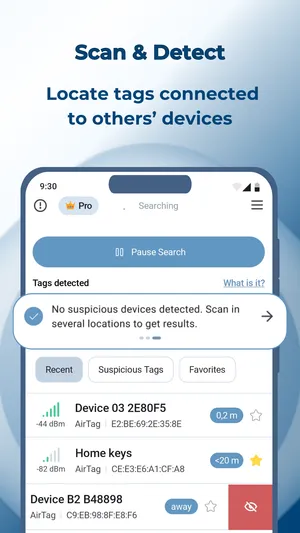
- “Is there a tracker on me?” — you want to know whether a nameless device is an Apple AirTag, a Samsung SmartTag or a Tile. TFind answers this. It scans, names any of the three families it hears, and shows how close each one is.
- “What is this thing?” — you want every Bluetooth device around you listed: headphones, watches, a fitness band, a car. TFind deliberately does not do that, because a list of forty devices hides the one that matters. A general scanner does — see the best Bluetooth scanner app for Android, by job.
If you are not sure, run TFind first. If it finds nothing, the nameless device is not one of the three tracker families, and you can stop worrying about that particular question.
Step 2 — what a tracker looks like, technically
Each tracker family announces itself with a fixed code in its Bluetooth broadcast, and TFind matches on exactly those codes and nothing else:
| Family | What it broadcasts | What TFind shows |
|---|---|---|
| Apple AirTag | Apple’s company ID with a Find My payload | ”AirTag”, distance band |
| Samsung SmartTag / SmartTag+ | service ID fd59 (unregistered) or fd5a (registered) | “SmartTag”, distance band |
| Tile | service ID feec or feed | ”Tile”, distance band |
Anything that does not carry one of those codes is not decoded at all. That is a deliberate rule, and it has a cost: a Chipolo, a Pebblebee, a Google Find Hub tag or a no-brand keyring tag produces nothing in TFind — not a weak match, nothing. The full coverage rule, with the list of what is not detected, is on which trackers TFind detects.
Step 3 — read the distance, then move
Bluetooth reaches roughly 5 to 10 metres and walls only partly block it. A device you see may be in the next room, the flat above, or a car at the lights. TFind shows a distance band from signal strength — warmer and colder, not an arrow. Walk, watch the band, and a device that stays close while you move is the one that is with you.
TFind also does the one thing a single scan cannot: it remembers. A tag it has seen twice, at least 15 minutes and 200 metres apart, gets flagged as suspicious — a stranger’s AirTag on the same train does not trip it, one that moves with you does. If that alert fires, go to how to find hidden Bluetooth trackers on Android, and if the place you suspect is your car, to how to find an AirTag in your car with an Android phone.
What no scan can tell you
Who owns the device. Bluetooth does not carry that, and no Android app can read it — not TFind, not a general scanner, not Android’s own unknown tracker alert. If you find a tracker you did not place, a physical search of the places a tag fits is worth more than any further scanning, and the tracker’s own maker has a process for reporting it.
What works on Android — and what doesn't
Works on Android
- Names a tracker by its Bluetooth signature — Apple's company ID for AirTag, service IDs fd59 / fd5a for Samsung SmartTag, feec / feed for Tile — instead of a blank 'unknown device'
- Tells you which of the three families an unknown tag belongs to and how close it is, so 'unknown Bluetooth device' becomes 'a Tile, a few metres away'
- Flags a tag that keeps reappearing near you as suspicious: seen twice, at least 15 minutes and 200 m apart
- Says nothing when the device is not a tracker it knows, and points you to a general Bluetooth scanner for everything else
Honest limits
- It cannot identify a Bluetooth device outside those three families. Headphones, watches, cars, Chipolo, Pebblebee and Google Find Hub tags show as nothing at all — not as 'unknown'
- No Bluetooth scan on any phone can tell you who owns a device; the broadcast does not carry that
- A tracker's advertised name is normally blank or a random string, so 'unknown device' in your Bluetooth settings is what every tracker looks like — it is normal, not evidence of one
- Bluetooth reaches ~5–10 m and walls only partly block it, so the device you see may be in the next room, the flat above, or a passing car
On iPhone? TFind is Android-only. On iPhone, Apple's Find My has AirTag detection built in; for other Bluetooth devices, iOS shows the same nameless entries Android does.
FAQ
- How do I identify an unknown Bluetooth device on my Android phone?
- First decide whether you are asking 'what is it' or 'is it a tracker'. For 'is it a tracker', TFind scans and names any Apple AirTag, Samsung SmartTag or Tile in range by its Bluetooth signature, with a distance band. For 'what is it' — headphones, a watch, a car — you need a general Bluetooth scanner that lists every device; TFind deliberately does not.
- Is an unknown Bluetooth device a tracker?
- Usually not. Most nameless Bluetooth entries are neighbours' headphones, TVs, watches and cars. A tracker is a small subset, and the three common families — AirTag, SmartTag, Tile — each broadcast a recognisable signature that TFind reads. If TFind shows nothing while your settings show a nameless device, it is not one of those three.
- Why does the Bluetooth device have no name?
- Trackers and many accessories do not broadcast a friendly name — they broadcast a manufacturer ID or a service ID and let the owner's app do the naming. So a blank or random name is normal for a tracker and normal for plenty of things that are not trackers. It tells you nothing on its own.
- Can I find out who owns an unknown Bluetooth device?
- No. Bluetooth does not carry ownership, and no Android app can read it. If you find a tracker you did not place and it keeps following you, the useful next steps are on our hidden-tracker page, and a physical search is worth more than any scan.
- What does a tracker look like in a general Bluetooth scan?
- A short, nameless entry that comes and goes. An AirTag advertises Apple's company ID with a Find My payload; a Samsung SmartTag advertises service ID fd59 or fd5a; a Tile advertises feec or feed. A general scanner shows those codes raw; TFind turns them into the family name and a distance.