
How to find an AirTag with a Samsung phone
TFind is an Android app that runs on any Samsung Galaxy phone or tablet with Android 8.0 or newer and finds nearby Apple AirTags over Bluetooth — no iPhone and no Apple ID needed.
Updated September 15, 2026
 Free to download · Android 8.0+ · contains ads & optional Pro (subscription or one-time)
A Samsung phone can find a nearby AirTag — no iPhone, no Apple ID, and no Samsung-specific trick. Install TFind on any Galaxy running Android 8.0 or newer, start a scan, and it lists the AirTags, Samsung SmartTags and Tile trackers broadcasting around you with an estimated distance. The scan is free, with ads. What a Samsung cannot do is the part worth reading first.
What your Samsung can and cannot do with an AirTag
An AirTag talks over Bluetooth Low Energy, and every Samsung Galaxy on Android 8.0+ has the radio to hear it. TFind recognises Apple’s signature in that broadcast, so the tag shows up in the scan list even though it is an Apple device and you are on a Samsung. That is the whole trick, and it is not Samsung-specific — a Pixel or a Motorola does exactly the same.
Three things stay out of reach, and they are Apple’s limits, not Samsung’s or TFind’s:
- You cannot manage the AirTag. Setting one up, naming it, tracking it on a map or putting it in Lost Mode needs an iPhone. Android can only detect an AirTag.
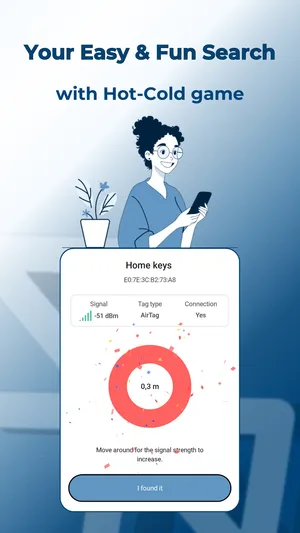
- You cannot do precision finding. Apple’s arrow-and-distance view uses ultra-wideband between an iPhone and an AirTag. Samsung’s own ultra-wideband works with SmartTag+, not with AirTags. TFind walks you in by Bluetooth signal strength — warmer and colder, not an arrow.
- An AirTag beside its owner’s iPhone stays almost silent. That is how Apple built it. TFind finds AirTags that are separated from their owner or unknown to you, which is the case that matters if you think one is hidden on you.
How to scan for an AirTag on a Samsung
- Install TFind from Google Play and grant Bluetooth and location permission — Android requires location permission for any Bluetooth scan.
- Tap scan. AirTags, SmartTags and Tiles in range appear in a list with a distance band.
- Walk slowly and watch the band change. Bluetooth reaches roughly 5 to 10 metres and walls block it, so if the list is empty, move and scan again.
- If the same unknown tag keeps appearing, TFind flags it as suspicious after it is seen twice, at least 15 minutes and 200 metres apart.
For the full walkthrough, including the sound play on a detected AirTag, see find a nearby AirTag on Android. If the AirTag is one you own and have lost, read how to find a lost AirTag on Android first — the owner-present rule changes what a scan can show you.
Samsung’s own tags in the same scan
Because you are on a Samsung, the tracker you meet may well be one of Samsung’s. TFind reads SmartTag and SmartTag+ by their Bluetooth service IDs in the same scan as AirTags, and shows the same distance band. Samsung’s SmartThings Find can also search for unknown SmartTags, and Android sends unknown tracker alerts on its own for the trackers it supports. The SmartTag specifics are on find a Samsung SmartTag on Android.
What no scan on any phone can do is tell you who owns a tag. Bluetooth does not carry that. If you find a tracker you did not place, the honest next page is how to find hidden Bluetooth trackers on Android.
What works on Android — and what doesn't
Works on Android
- Runs on Samsung Galaxy phones and tablets on Android 8.0+ — it is the same TFind as on any other Android phone
- Finds a nearby Apple AirTag by Apple's Bluetooth signature and shows an estimated distance band, so you can walk toward it
- Reads Samsung's own SmartTag and SmartTag+, and Tile, in the same scan — one app for the three families
- Flags an unknown tag that keeps reappearing near you: seen twice, at least 15 minutes and 200 m apart
Honest limits
- An AirTag next to its owner's iPhone stays almost silent by Apple's design. A Samsung phone cannot change that — TFind finds separated and unknown AirTags
- No precision finding. Samsung's ultra-wideband works with SmartTag+, not with AirTags, and TFind uses Bluetooth signal strength only — warmer and colder, not an arrow
- Bluetooth reaches ~5–10 m and walls block it; an AirTag rebroadcasts about every 15 minutes, so a scan can miss it and catch it on the next pass
- A scan finds the tag, not its owner. No Android app can read who registered an AirTag
On iPhone? TFind is Android-only. If you also have an iPhone, Apple's Find My has AirTag detection built in — and it is the only way to manage an AirTag you own.
FAQ
- Can a Samsung phone find an AirTag?
- Yes. Any Samsung Galaxy on Android 8.0 or newer can scan for a nearby AirTag over Bluetooth with TFind, free, with ads. It shows how close the tag is and lets you walk toward it. It cannot do Apple's ultra-wideband precision finding, and it cannot find an AirTag that is sitting beside its owner's iPhone.
- Do I need an iPhone or an Apple ID to find an AirTag?
- Not to find one near you. TFind reads the Bluetooth signal an AirTag broadcasts, and that needs no Apple account. You do need an iPhone to set up, manage or track your own AirTag — Apple does not let Android do that.
- Why does my Samsung not find the AirTag I know is there?
- The usual reason is that the AirTag is with its owner's iPhone, so it stays almost silent by Apple's design. The second reason is Bluetooth itself: reach is about 5 to 10 metres, walls block it, and an AirTag rebroadcasts only every 15 minutes or so. Move around and scan again.
- Can my Samsung find a SmartTag that is not mine?
- Yes. TFind reads Samsung SmartTag and SmartTag+ by their Bluetooth service IDs, whoever owns them, and shows the distance band. Samsung's own SmartThings Find can search for unknown SmartTags as well. TFind adds AirTag and Tile to the same scan.
- Does Android already warn me about an AirTag on its own?
- Yes, for the trackers it supports. Android sends unknown tracker alerts without any app installed. TFind is the scan you run yourself when you want to look right now, and it also covers Samsung SmartTag and Tile.