
Find a Samsung SmartTag on Android
TFind is an Android app that detects Samsung SmartTag and SmartTag+ over Bluetooth — no Samsung account or Galaxy phone required.
Updated August 14, 2026
 Free to download · Android 8.0+ · contains ads & optional Pro (subscription or one-time)
An Android phone can detect a Samsung SmartTag. TFind scans for one free. It reads the Bluetooth IDs that SmartTag and SmartTag+ broadcast (fd59 / fd5a). It runs on any Android 8.0+ phone. You need no Galaxy device and no Samsung account.
Lost a Samsung SmartTag — or worried one is tracking you — but you’re on a non-Samsung Android phone? TFind shows how close the tag is, and warns you if an unknown tracker keeps following you.
How TFind finds a SmartTag
- Open TFind and tap Start Scan — grant Bluetooth and Location so scanning can run.
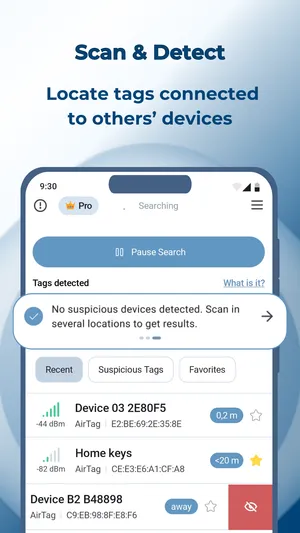
- TFind lists nearby SmartTag / SmartTag+ trackers (alongside any AirTags and Tiles it sees).
- Watch the distance band and move around — signal strength climbs as you get closer.
- Mark trackers you own as My Tags so they stop triggering unknown-tracker alerts.
Why a dedicated Android scan
Samsung builds SmartThings Find around Galaxy devices. TFind takes a different route: it reads the SmartTag’s Bluetooth advertisement directly, so it works on any Android 8.0+ phone. It is free to download and scan.
That matters in two situations. Someone else holds the Galaxy account that registered the tag. Or you want to check whether a SmartTag you don’t own is moving with you.
How do I check whether a SmartTag is near me?
Open TFind on your Android phone and tap Start Scan. Any SmartTag or SmartTag+ broadcasting within Bluetooth range appears in the list with an estimated distance band. Bluetooth reaches about 5–10 metres and walls cut it down, so walk the room and scan from more than one spot.
A SmartTag in the list is not evidence that someone is tracking you. Tags belong to the people around you as well. TFind flags a tracker as suspicious only after it sees the same one twice, at least 15 minutes and 200 metres apart — the test for a tag that travels with you.
What works on Android — and what doesn't
Works on Android
- Detects Samsung SmartTag and SmartTag+ by their Bluetooth LE service IDs (fd59 / fd5a)
- Free to download and scan, with ads — Pro adds the map and removes them
- Shows an estimated distance band so you can walk toward the tag
- Alerts if the same unknown tracker keeps appearing near you
- Runs on any Android 8.0+ phone — not just Samsung Galaxy
Honest limits
- Bluetooth reach is ~5–10 m and walls block it — move around to pick the signal back up
- Distance is estimated from signal strength, so it jumps around; it is not an exact arrow
- Play Sound works on AirTags only — SmartTags do not expose a beep over Bluetooth
- Detects the tag, not its owner — Bluetooth does not reveal who registered it
On iPhone? TFind is Android-only. On iPhone, use Apple's built-in tracker-detection and Find My safety alerts.
FAQ
- Do I need a Samsung phone to find a SmartTag?
- No. TFind detects Samsung SmartTag and SmartTag+ on any Android 8.0+ phone over Bluetooth — you don't need a Galaxy device or a Samsung account.
- Can TFind make my SmartTag ring?
- No. Playing a sound is supported on Apple AirTags only; Samsung SmartTags don't expose a ring command over Bluetooth, so TFind guides you by distance instead.
- Can it tell who owns a SmartTag it finds?
- No. Bluetooth doesn't broadcast an owner, so no detector can reveal that. TFind tells you a SmartTag is present and roughly how close it is.