
Apple's Tracker Detect on Android: what it finds and what it misses
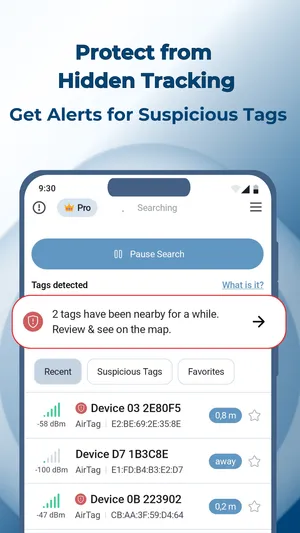
TFind is an Android app that scans for Apple AirTag, Samsung SmartTag and Tile, and can keep scanning in the background to warn you about a tracker that travels with you.
Updated October 31, 2026
 Free to download · Android 8.0+ · contains ads & optional Pro (subscription or one-time)
Apple’s Tracker Detect is a free Android app that scans for an AirTag near you, but only when you open it and tap Scan. It looks for trackers that are away from their owner and work with Apple’s Find My network. It has no background alerts, and it does not look for Samsung SmartTag or Tile.
What Tracker Detect does
Apple made Tracker Detect for people with Android phones who think an AirTag may be tracking them. Apple’s Play listing says it looks for item trackers that are separated from their owner and compatible with Find My. That means AirTag and Find My-compatible tags from other companies.
- Open Tracker Detect.
- Tap Scan, and keep the app open while it looks.
It is Apple’s own app, it is free, and its listing says it collects no data. Apple last updated it on 15 December 2025. It rates 2.9 on Google Play.
What it misses
- No background scanning. It scans only while you hold it open. It cannot warn you about a tracker you never went looking for. The two most-helpful reviews on its listing ask Apple for exactly this.
- No Samsung SmartTag or Tile. It looks for Find My-compatible trackers only.
Where TFind fits
TFind is a free Android app with ads that covers the two gaps:
- Background alerts. Start a background check and TFind keeps watching, with a notification in your status bar. It warns you when it sees the same tracker at least twice, 15 minutes and 200 metres apart. A drive or a walk across town is what trips it.
- Three tracker families. It reads Apple AirTag, Samsung SmartTag and Tile in one list, and shows how close each one is.
TFind is not Apple’s app, and it rates 3.7 on Google Play. The background scan costs battery. If you only want a quick AirTag check, Tracker Detect or Android’s built-in scan is enough.
Related pages
- Best AirTag and tracker detector apps for Android — five apps compared, including Tracker Detect
- Do AirTags work with Android? — what Android can and cannot do with an AirTag
- How to find hidden Bluetooth trackers on Android — if you think a tag is following you
- Which trackers TFind detects — the full list
What works on Android — and what doesn't
Works on Android
- Answers what Apple's Tracker Detect does on Android before anything else: a free manual scan for AirTags and Find My-compatible trackers away from their owner
- Adds what Tracker Detect leaves out: TFind can keep scanning in the background and alert you when the same tracker is seen twice, 15 minutes and 200 metres apart
- Reads Samsung SmartTag and Tile as well as AirTag, the two families Tracker Detect does not look for
Honest limits
- TFind is not made by Apple, and it rates 3.7 on Google Play. Tracker Detect is Apple's own app and collects no data
- TFind's background scan keeps a notification in your status bar and costs battery. Tracker Detect uses battery only while you scan
- Neither app can find a tracker that is not broadcasting, and an AirTag next to its owner's iPhone stays almost silent
- Neither app can show who owns a tracker. A Bluetooth broadcast carries no owner name
On iPhone? TFind and Tracker Detect are Android apps. On an iPhone, Find My warns you about an unknown AirTag on its own.
FAQ
- What is Apple's Tracker Detect app on Android?
- It is Apple's free Android app for finding an AirTag that may be with you. It scans for item trackers that are away from their owner and work with Apple's Find My network: AirTag and Find My-compatible tags from other companies. You open it and tap Scan; it does not run on its own.
- Does Apple's Tracker Detect scan in the background?
- No. It scans only while you have it open and start a scan. It cannot warn you about a tracker you never went looking for. The most-helpful reviews on its Play listing ask Apple to add background scanning. TFind can scan in the background, with a notification that stays in your status bar.
- Does Tracker Detect find Samsung SmartTag or Tile?
- No. Apple's listing says it looks for trackers compatible with Apple's Find My network. A Samsung SmartTag or a Tile uses a different format. TFind reads AirTag, Samsung SmartTag and Tile.
- Should I use Tracker Detect or TFind?
- Use Tracker Detect if you want Apple's own app for a one-off AirTag check; it is free and collects no data. Add TFind if you want alerts without remembering to scan, or if the tag could be a Samsung SmartTag or a Tile. TFind is free with ads.
- Does Android already detect AirTags without an app?
- Yes. Android has built-in unknown tracker alerts and a manual scan under Settings, then Safety & Emergency, then Unknown tracker alerts. Apps such as Tracker Detect and TFind add to that; TFind also shows how close a tag is.